You have list of fonts to choose from when creating your newsletter draft in Artful Mail 3.
Follow these steps to choose a font other than the default global font:
- from FASO Site Dashboard
- click Newsletter Campaigns (left menu - if you don't see the full options on the left, click the 3 bar menu icon, upper left corner)
- click New Newsletter button
- click Use the Advanced Newsletter Editor button
- choose a template
- enter your text in a Text Content block
- highlight the text
- in the tool bar, click the drop down arrow to the right of Global font
- select your font choice

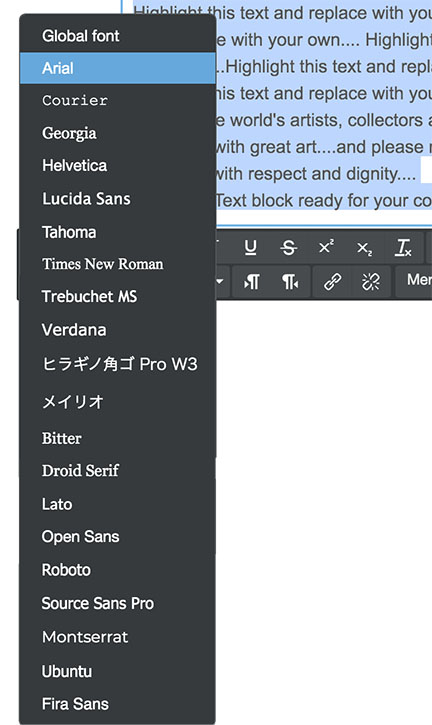
Available Fonts:
- Arial
- Courier
- Georgia
- Helvetica
- Lucida
- Tahoma
- Times New Roman
- Trebuchet MS
- Verdana
- Bitter
- Droid Serif
- Lato
- Open Sans
- Roboto
- Source Sans Pro
- Montserrat
- Ubuntu
- Fira Sans
NOTE: We cannot add additional fonts because not all email clients will support those fonts. The newsletter would not render properly in any font not listed as an option. |
NOTE: If your fonts on you mobile device do not match what you see please keep in mind that font sizes are overridden and optimized for mobile clients to better match that form factor and to prevent unexpected layout shifts. In the case of some email clients (such as Apple Mail on mobile), you will not be able to override them. |
11032026