You can forward your FASO domain email account (aka branded, personalized email) to another email such as your Gmail or Yahoo account. You will then be able to continue to check email in the way you are familiar with.
If you don't want a recipient to see your other email address (gmail, yahoo, aol etc), be sure to only reply from your FASO domain email.
Bonus: Every time you use your domain email, it promotes your website thereby your work!
To forward your email account to another email address, login to your webmail account.
One way to login:
Another way to login:
- from FASO dashboard
- Email (left menu - if you don't see the full options on the left, click the 3 bar menu icon, upper left corner)
- click Login to the right of the email
click Your Email Accounts (at top) if necessary - enter Password (email account Password may be different from your control panel Password)
- click Log In
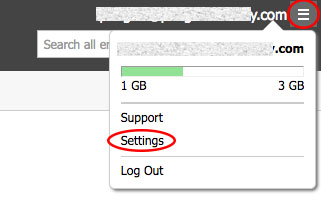
- click the menu icon (top right - looks like 3 horizontal bars)
- click Settings
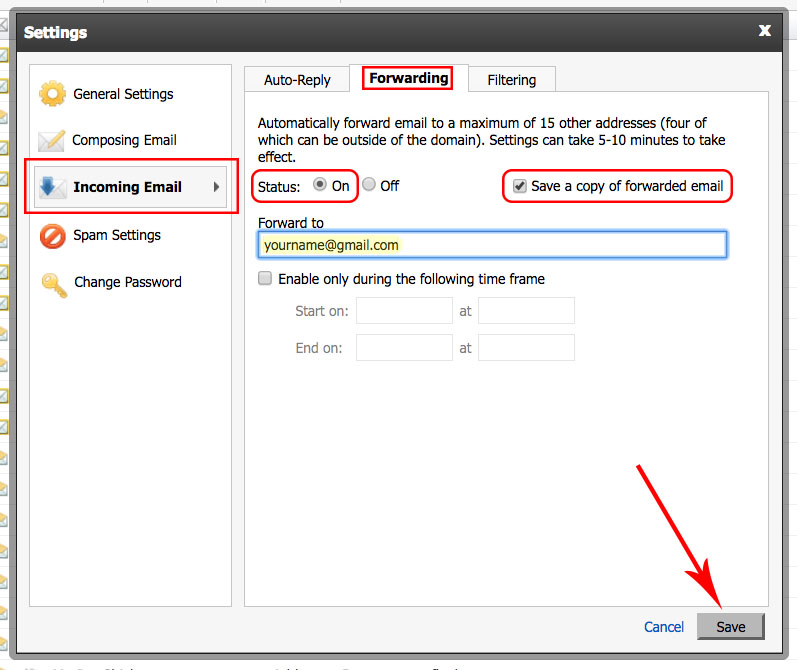
- click Incoming Email (on the left)
- click the Forwarding tab
- set status to: ON
- in the Forward To field, enter your other email address
NOTE: Separate multiple email addresses with a comma or semicolon. - IMPORTANT: Check the box labeled
Save a copy of forwarded email
This way you'll have a backup - click Save
08252026